
Timing matters when you’re running a conference, leading a meeting, or rehearsing a talk. A free online countdown timer on screen keeps you on track and signals when to wrap up. Moreover, it helps the whole room stay focused. Dozens of timer tools exist—but which one fits your needs?
Over the past month, I tested several popular web-based timers across live rehearsals, team meetings, and a small virtual event. Below is an honest comparison of three best free online countdown timers and stopwatches that stood out. For more productivity tips and tech guides, check out our other articles. Each tool works in the browser with no download or sign-up.
What to Look for in a Free Online Countdown Timer
Before diving into specific tools, here’s what matters when choosing a free online event timer.
Visibility – Read at a glance. Large digits and clear contrast matter more than fancy design, even from across a room.
No sign-up friction – Open a link and start timing. That’s it. Forced accounts get in the way of quick meetings.
Fullscreen mode – Presenters often use a second screen or projector. Likewise, fullscreen keeps the display clean.
Flexibility – Presets (5, 18, 30 minutes) save time. Furthermore, custom durations and count-up mode help with different formats.
Reliability – Timers should keep running when the tab is in the background, even when the screen dims.
Sharing (optional) – Remote setups benefit from shareable links so others can see the same countdown.
EventTimer.io
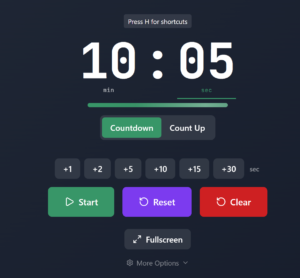
EventTimer.io positions itself as a professional event timer. In my testing, it handled a 45-minute workshop and 5-minute practice talks well. Furthermore, if you run presentations often, our guide to responsive web design has useful tips for displaying content across screens and projectors.
First impressions
Loads quickly. No account is needed to start. The default view is a clean countdown with large numbers and a simple control bar. As a result, it feels built for serious use, not a toy.
Key features
Preset timers – Many presets cover common scenarios: 5-minute breaks, 25-minute Pomodoro, 18-minute TED-style talks, 7-minute workouts, 30-minute meetings, and exam timers for classrooms. (For more on interactive tools in education, see our Kahoot overview.) Each preset has its own URL, so you can bookmark or share what you need.
Custom duration – Bypass presets and set any duration in minutes or seconds. Handy for odd lengths like 12 or 17 minutes.
Fullscreen mode – One click switches to fullscreen. Ideal for projecting on a second monitor.
Themes and display options – Dark, light, and more. Hide seconds or show milliseconds. Good for precision.
Countdown and count-up – Switch between counting down or up. Works well for open-ended Q&A segments.
Event Manager (optional) – Conferences with several sessions can use events with multiple timers. Manage them in one place. This feature requires an account.
Shareable links – Others can see the same countdown. Helpful for remote setups.
What worked well
No sign-up is required for the main timer, which is a big plus. Presets and direct URLs let you jump straight into common scenarios. Furthermore, fullscreen mode is straightforward and reliable. The tool also works well on mobile. Ultimately, it feels free and focused on professional use rather than gimmicks.
Limitations
Event Manager and advanced features require an account. Some presets include extra content—tips and guidance—that not everyone may want. Otherwise, the core timer remains solid and useful.
Best for
EventTimer suits presenters, meeting facilitators, and trainers. Anyone needing presets and fullscreen will find it useful. Therefore, it’s also a good fit if you run recurring events and want an Event Manager to organize multiple timers.
Verdict: A strong choice for professional presentations. No sign-up for basic use. Wide range of presets. Very practical.
Online Stopwatch
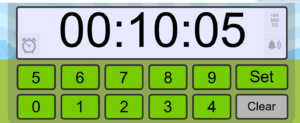
Online Stopwatch is one of the oldest web timers. Simple and reliable. During testing, it handled quick meetings and rehearsals well when extras weren’t needed.
First impressions
Classic layout. A bit dated but clear. Large display and straightforward controls. No onboarding—you just start. Additionally, the site offers multiple tools via tabs (stopwatch, countdown, and more).
Key features
Stopwatch and countdown – Run a stopwatch or set a countdown. Enter hours, minutes, seconds.
Simple interface – Large digits and minimal clutter. In contrast to busier tools, it’s easy at a glance.
No account – Completely anonymous. No sign-up needed.
Lap times – Lap timing supports tracking segments or intervals.
Multiple tools – Egg timer, metronome, and others offer variety.
What worked well
Online Stopwatch is very fast to start with no configuration. Many people already know it. Additionally, it works on a wide range of devices and browsers. Therefore, lap timing proves useful for interval-based activities like workouts or timed drills.
Limitations
Design feels outdated compared to newer tools. Few or no presets mean you set the time manually each time. Likewise, there’s no dedicated fullscreen mode as clean as EventTimer’s. No built-in sharing or collaboration. Extra tools and ads can make the page feel busy.
Best for
Quick one-off timing works well. Stopwatch-style use. No-frills interface. However, it’s less suited if you want presets or a polished presentation look.
Verdict: A reliable classic. Simple and immediate. No presets or event management needed.
Big Timer
Big Timer is minimal and visual. Popular for workshops and virtual events. Testing covered 25-minute focus sessions and team standups. Similarly to EventTimer, it works well on shared screens.
First impressions
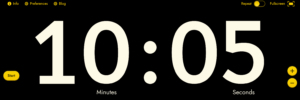
Everything is big. Sparse interface. Often just a large countdown and simple controls. Designed for visibility from a distance.
Key features
Large display – Numbers are emphasized. Good for projecting.
Quick setup – Set a duration (5, 10, 15, 25 minutes) and start. That’s it.
Sound alerts – Optional alerts when the timer ends.
Fullscreen-friendly – Layout suits fullscreen. Few distractions.
URL-based sharing – Some versions share via URL.
What worked well
Big Timer is extremely quick to set up. Numbers stay very readable from a distance. Moreover, the uncluttered layout keeps attention on the countdown. Consequently, it works well for short, focused sessions like standups or quick workshops.
Limitations
Fewer presets and customization options exist compared to EventTimer. Less content around timing—no tips or context for specific use cases. Some power users might find the interface too minimal.
Best for
Facilitators wanting a fast, visual timer will appreciate Big Timer. Workshops and meetings suit it well. Consequently, it’s also good for virtual events where a clear countdown matters. Minimal setup required.
Verdict: “Set it and forget it” sums it up. Strong visibility. Simple. Fewer presets than EventTimer.
Side-by-Side Comparison
Below is a summary of how the three tools compare across key features.
| Feature | EventTimer.io | Online Stopwatch | Big Timer |
|---|---|---|---|
| No sign-up required | Yes | Yes | Yes |
| Preset timers | Many presets | Manual only | Limited |
| Fullscreen mode | Yes | Basic | Yes |
| Countdown & count-up | Both | Both | Mainly countdown |
| Themes/customization | Yes | Minimal | Limited |
| Shareable links | Yes | No | Some versions |
| Event/multi-timer support | Event Manager | No | No |
| Lap times | No | Yes | No |
| Mobile-friendly | Yes | Yes | Yes |
| Best for | Professional events | Quick timing | Visual focus |
How I Tested
Each timer was put through real scenarios over several weeks. EventTimer handled a 45-minute workshop, 5-minute rehearsals, and Pomodoro-style sessions. Meanwhile, Online Stopwatch covered ad-hoc meeting timing, lap intervals, and general stopwatch use. Big Timer ran 25-minute focus sessions, virtual standups, and shared-screen workshops.
I evaluated setup ease, readability, fullscreen behavior, and mobile use. Additionally, I checked tab-switching behavior and account requirements. All three performed well on laptop, tablet, and projector. For more on how web tools adapt to different screens, see our responsive webpage guide. Ultimately, each tool was free for basic use.
Choosing the Right Timer for You
Presentations and professional events – EventTimer.io leads here with presets, fullscreen, and optional event management. TED-style and meeting presets help if you run talks often. See our productivity resources for more tools.
Quick, one-off timing – Online Stopwatch wins here. Fast and familiar. No setup.
Maximum visibility – Big Timer’s large display works across a room with minimal distraction on shared screens.
Multi-timer events – When you need multiple timers under one event, the Event Manager in EventTimer is the only option. Ideal for conferences.
Sharing with a remote audience – Shareable links get everyone on the same countdown; EventTimer handles this most straightforwardly.
Final Verdict
All three tools are solid and free. The right choice depends on your use case. EventTimer.io offers the best all-around experience with strong presets, fullscreen, sharing, and an optional Event Manager. Meanwhile, Online Stopwatch excels at quick timing—reliable and familiar. Big Timer shines when you need large displays for workshops and shared screens.
Running conferences or giving talks? EventTimer.io is my top pick. For ad-hoc timing, Online Stopwatch holds up well. Likewise, Big Timer does the job when you want a fast, big display.
Quick Summary: Best Free Countdown Timers by Use Case
Here’s which tool fits each use case best.
| Use Case | Recommended Tool |
|---|---|
| Presentations & talks | EventTimer.io |
| Meetings & workshops | EventTimer.io or Big Timer |
| Quick ad-hoc timing | Online Stopwatch |
| Multi-timer events | EventTimer.io |
| Maximum on-screen visibility | Big Timer |
| Sharing with remote participants | EventTimer.io |
FAQ: Free Online Countdown Timer
What is the best free countdown timer for presentations?
EventTimer.io. It offers preset timers (TED Talk, meeting, Pomodoro), fullscreen mode, and no sign-up. Big Timer is a solid alternative if you prioritize visibility.
Do I need to sign up to use these timers?
No. All three let you start immediately without an account or login.
Which free timer works for Zoom or screen sharing?
All three work in the browser. EventTimer and Big Timer have fullscreen modes. EventTimer adds shareable links so remote participants see the same countdown.
Is there a free countdown timer for conferences?
Yes. EventTimer’s Event Manager handles multi-timer conferences. Create events and add timers per session. That feature needs an account; basic timers do not.
— Sarah Chen is a freelance facilitator and presentation coach. She blogs about productivity tools and event management at blogpandit.com.

I was looking for Eventtimers and this helped. thanks for sharing the article!
Very good i like it